
How I Designed our First Structured Literacy Lab Landing Page on Framer
A Step-by-step record of the thought process behind building a landing page for the first Structured Literacy Lab digital book, which we plan to release through Apple Books and Google Play Books.
Read more on the Launch of Structured Literacy Lab.
I recently completed the first landing page for a Structured Literacy Lab book.
The page introduces Easter Hunt at the Beach, a story-based spelling resource that helps children become familiar with 128 words in which ea represents the long /ē/ sound.
I built the page in Framer.
I wanted to document the thinking behind it: why I included each section, why I arranged the sections in this order and why I deliberately left certain things out.
This is not a guide to creating the perfect landing page. It is a record of the decisions I made while building this particular page.
A few things to note:
- I am not a designer.
- I am new to Framer.
- It took me five days to build this first landing page, mainly because I was learning Framer as I worked. For example, I followed a 21-minute tutorial on creating a footer, but building that footer myself took six hours.
- I used several YouTube tutorials to learn the features I needed. I have linked to them at the end of this article.
You can view the completed page here: View the Easter Hunt at the Beach landing page on StructuredLiteracyLab
I wanted to build a landing page for the first Structured Literacy Lab book.
The page needed to:
-> Explain the value of both the story and its accompanying activities.
-> Encourage interested visitors to download the book from Apple Books or Google Play Books.
Note: This first book will be free. The objective is to let families and educators try the resource before deciding whether to purchase other books in the collection.
1. Header without the Navigation Menu

The first decision was about what not to include.
The header contains the Structured Literacy Lab logo, but no conventional navigation menu.
There are no links to an About page, other books, resources or the SIMEFF website.
This was deliberate.
A normal website needs navigation because visitors may arrive with different intentions. One person may want to read about the company, another may want to browse products, and another may want to contact the business.
This page has only one purpose: to introduce one book and encourage the visitor to download it.
Every additional navigation link creates another opportunity for the visitor to leave before completing that action.
I therefore treated this as a focused landing page rather than a standard website page. The logo provides the necessary brand identity, but the absence of navigation keeps the visitor moving down the page.
I may test a minimal navigation menu later. For the first version, however, I wanted to remove unnecessary exits.
2. Making the Hero Explain the Product Immediately
The hero section needed to answer one question immediately:
What will this book help a child do?
The first versions relied too heavily on the book title. Although Easter Hunt at the Beach is an engaging title, it does not tell a parent or teacher what the resource teaches.
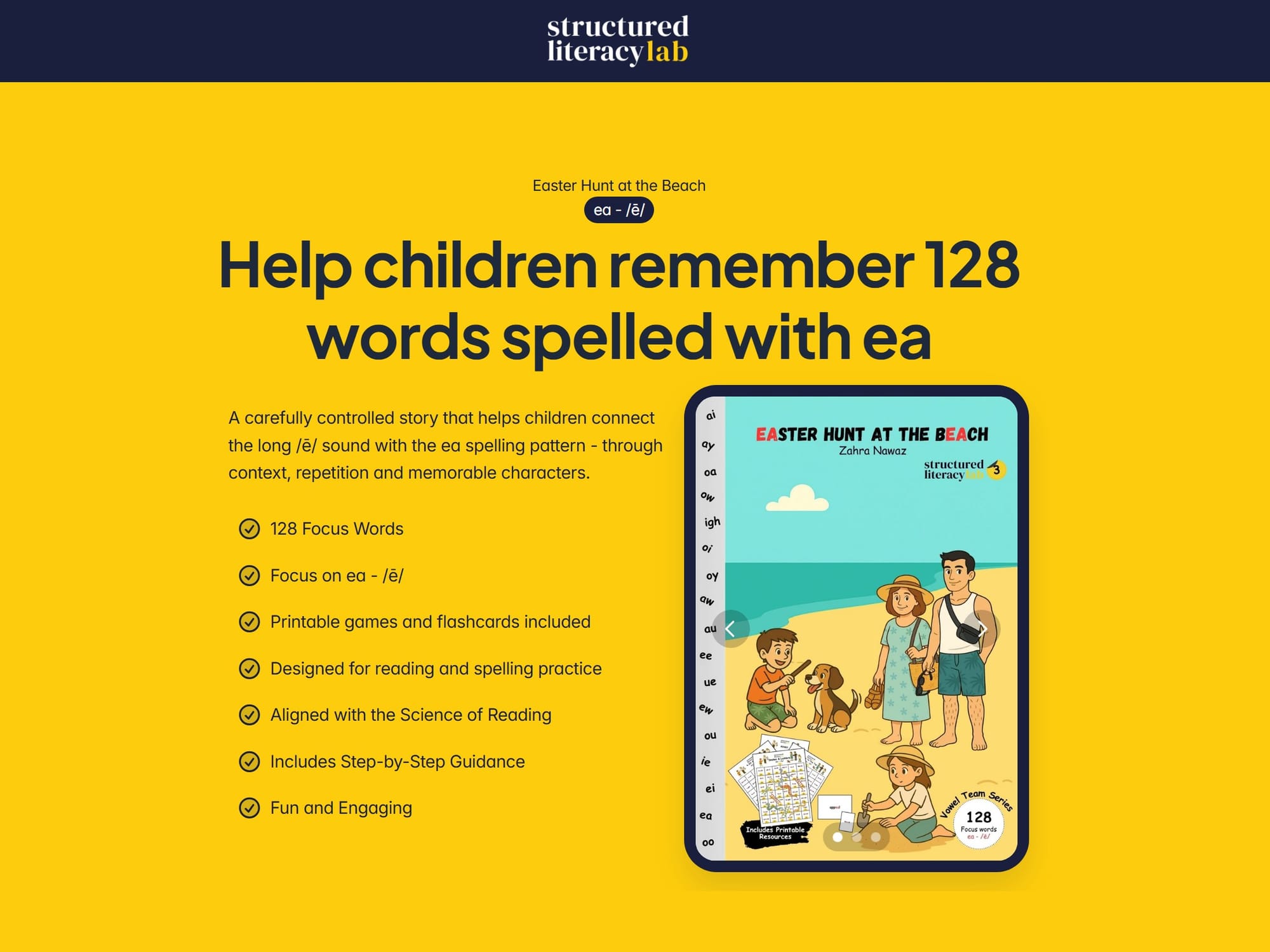
That led to the main heading:
Help children remember 128 words spelled with ea
This is the clearest and most important benefit of the resource, so I placed it above the fold.
Below the heading, I added a short explanation:
A carefully controlled story that helps children connect the long /ē/ sound with the ea spelling pattern - through context, repetition and memorable characters.
The heading provides the outcome. The supporting sentence introduces the method.
Why I Used an iPad Mock-up
The book is a digital product. I wanted visitors to understand that immediately.
Instead of showing only the book cover as a flat image, I placed it inside an iPad mock-up. This helps the visitor picture how the book will actually be viewed and used.
It also gives the hero section a clear visual focal point without requiring an unrelated stock photograph.
How I Chose the Feature Points
The hero includes a small number of feature points. These were selected to answer the practical questions a parent or educator is likely to have:
- What spelling pattern does it cover?
- How much material is included?
- Is this only a story, or are teaching resources included?
I deliberately avoided placing every feature in the hero. Visitors only need enough information to decide whether the resource is relevant. The full contents are explained further down the page.
The download button appears in this section because some visitors will understand the product immediately and will not need to read the entire page before acting.
3. Turning the Spelling Problem Into Something Visual
The next section demonstrates the problem the book is designed to address.
I could have written a paragraph explaining that the long /ē/ sound can be spelled in several ways. That would have been accurate, but it would also have been abstract.
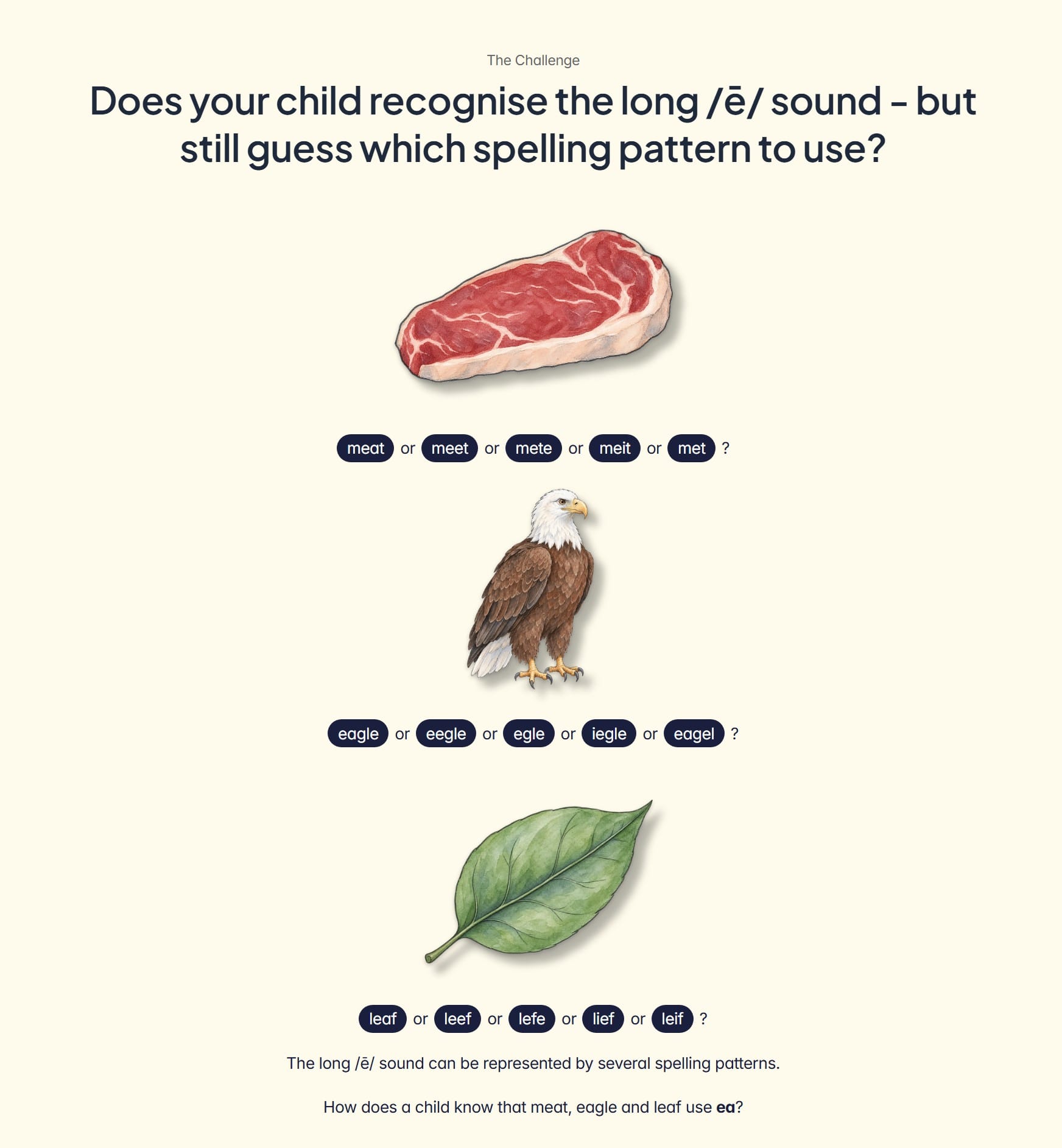
Instead, I used three illustrated words:
- meat
- eagle
- leaf
Each correct word appears alongside several plausible misspellings.
For example:
meat, meet, mete, meit, met or meatt?
A parent or teacher can recognise the problem without first understanding specialist literacy terminology.
A child may hear the word correctly and know every sound in the word, but still be uncertain about how the long /ē/ sound should be represented.
The illustrations make the section easier to understand and less text-heavy. They also show that the problem affects ordinary, familiar words - not obscure vocabulary.
The section ends with:
How does a child know that meat, eagle and leaf use ea?
This question prepares the visitor for the next section. I don't present the solution before the visitor understands the problem.
4. Explaining the Solution Without Overloading the Visitor
Once the spelling problem is clear, the page explains how the book addresses it.
The central idea is straightforward:
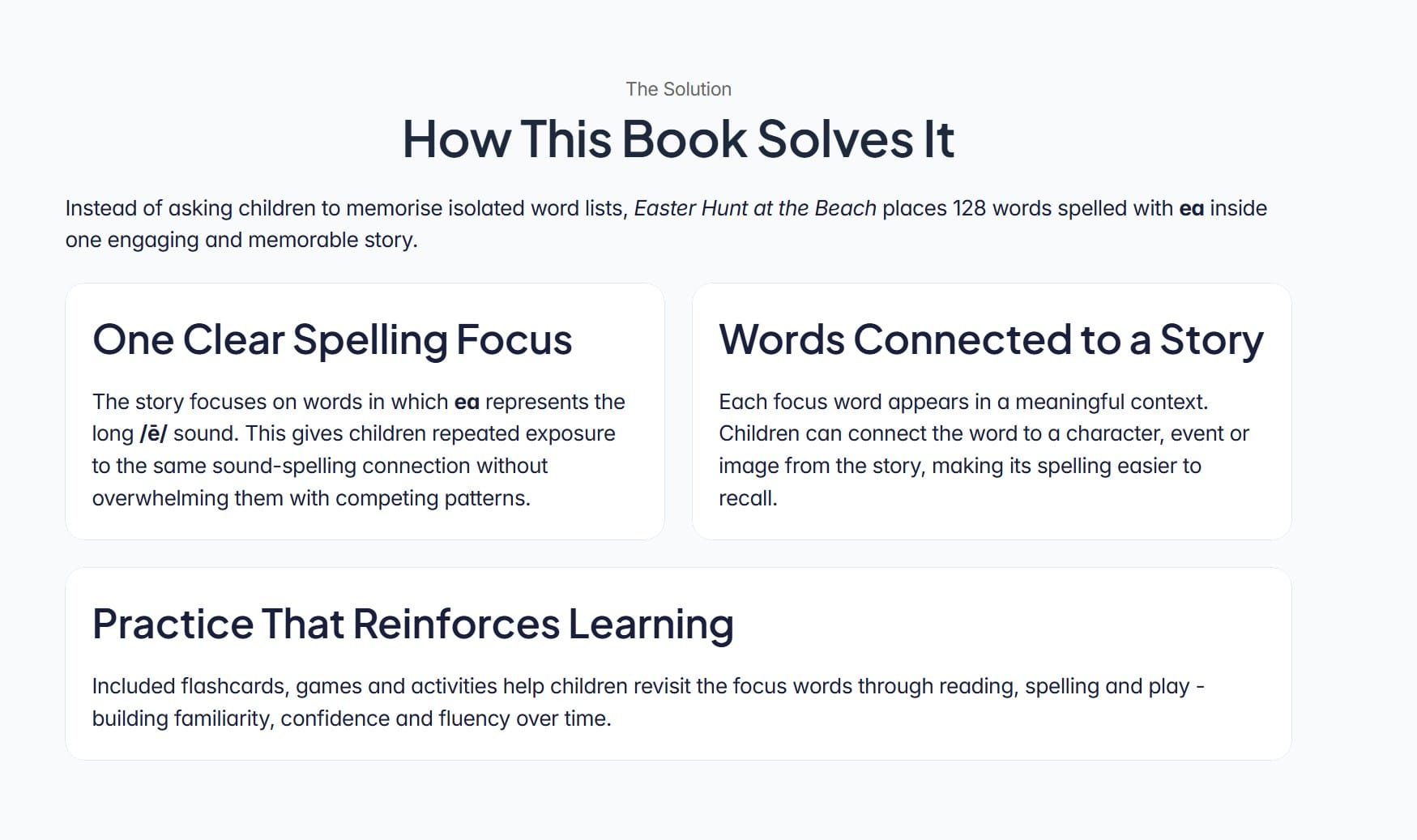
Instead of asking children to memorise 128 isolated words, the book places them in one memorable story.
I divided the explanation into three parts:
One Clear Spelling Focus
The story concentrates on words in which ea represents the long /ē/ sound.
This is the resource's instructional focus, but I didn't want to turn the landing page into a lengthy explanation of spelling instruction.
Words Connected to a Story
Children encounter the words through characters, illustrations and events.
The story gives them something meaningful to associate with each word rather than asking them to remember a spelling in isolation.
Practice That Reinforces Learning
The book is supported by flashcards, games and activities.
This shows that the story is not intended to work alone. It is part of a repeated process of reading, recalling and practising the focus words.
I kept these explanations short because the visitor needs to understand the mechanism, not complete a professional-development lesson before downloading the book.
5. Showing Exactly What the Visitor Receives
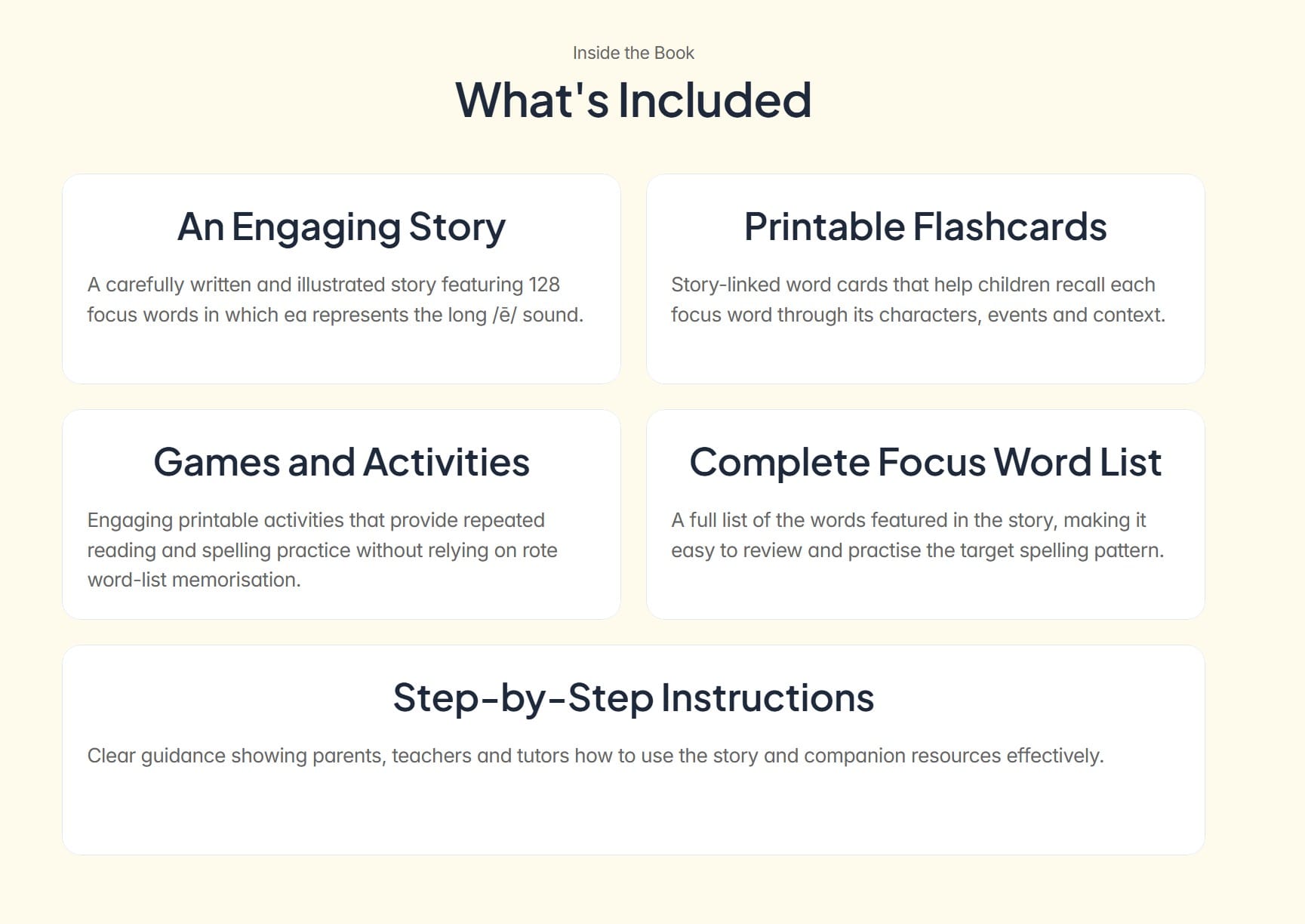
After explaining how the resource works, I needed to make the offer tangible.
“What’s included?” is a different question from “How does it work?”
The page therefore has a separate section showing that the download contains:
- An illustrated story
- Printable flashcards
- Games and activities
- A complete focus-word list
- Step-by-step instructions
This section went through several revisions.
Each item now explains both what is included and why it is useful. This is more persuasive than presenting a simple inventory without context.
6. Clarifying Who the Resource Is For
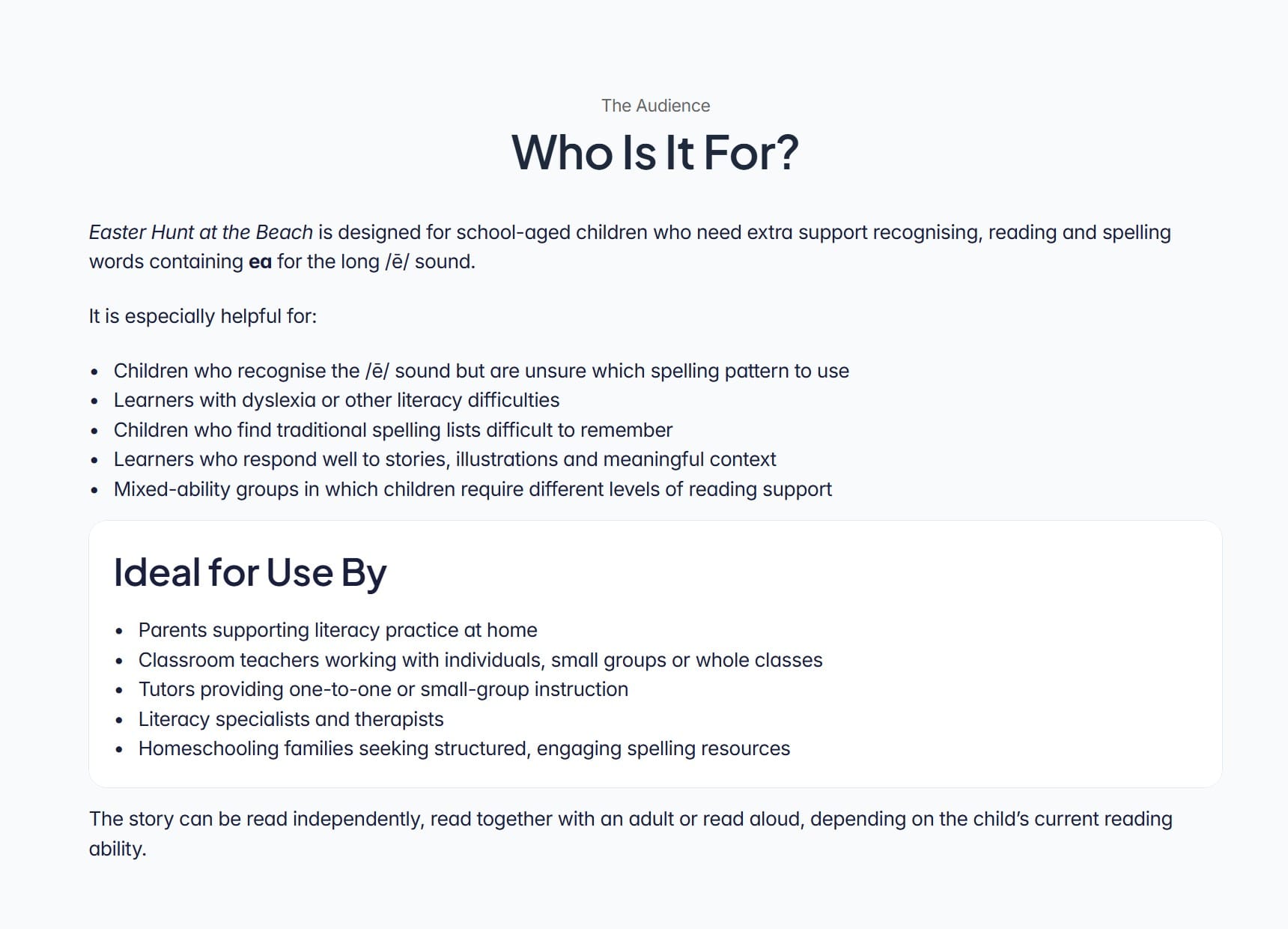
The child uses the resource, but an adult will usually decide whether to download it.
The page therefore needs to speak to two audiences.
The first is the learner. The book may be helpful for:
- Children who recognise /ē/ but are unsure which spelling pattern to use
- Learners with dyslexia or other literacy difficulties
- Children who struggle with conventional spelling lists
- Learners who respond well to stories and illustrations
- Children working at different levels within the same group
The second audience consists of the adults who may use the resource:
- Parents
- Teachers
- Tutors
- Literacy specialists and therapists
- Homeschooling families
I also wanted to make it clear that the child does not necessarily need to read the story independently. Depending on the child’s reading ability, the book can be read alone, read together or read aloud by an adult.
Without this clarification, some parents may assume the book is unsuitable if their child cannot yet read every word independently.
7. Using Reviews to Add Reassurance
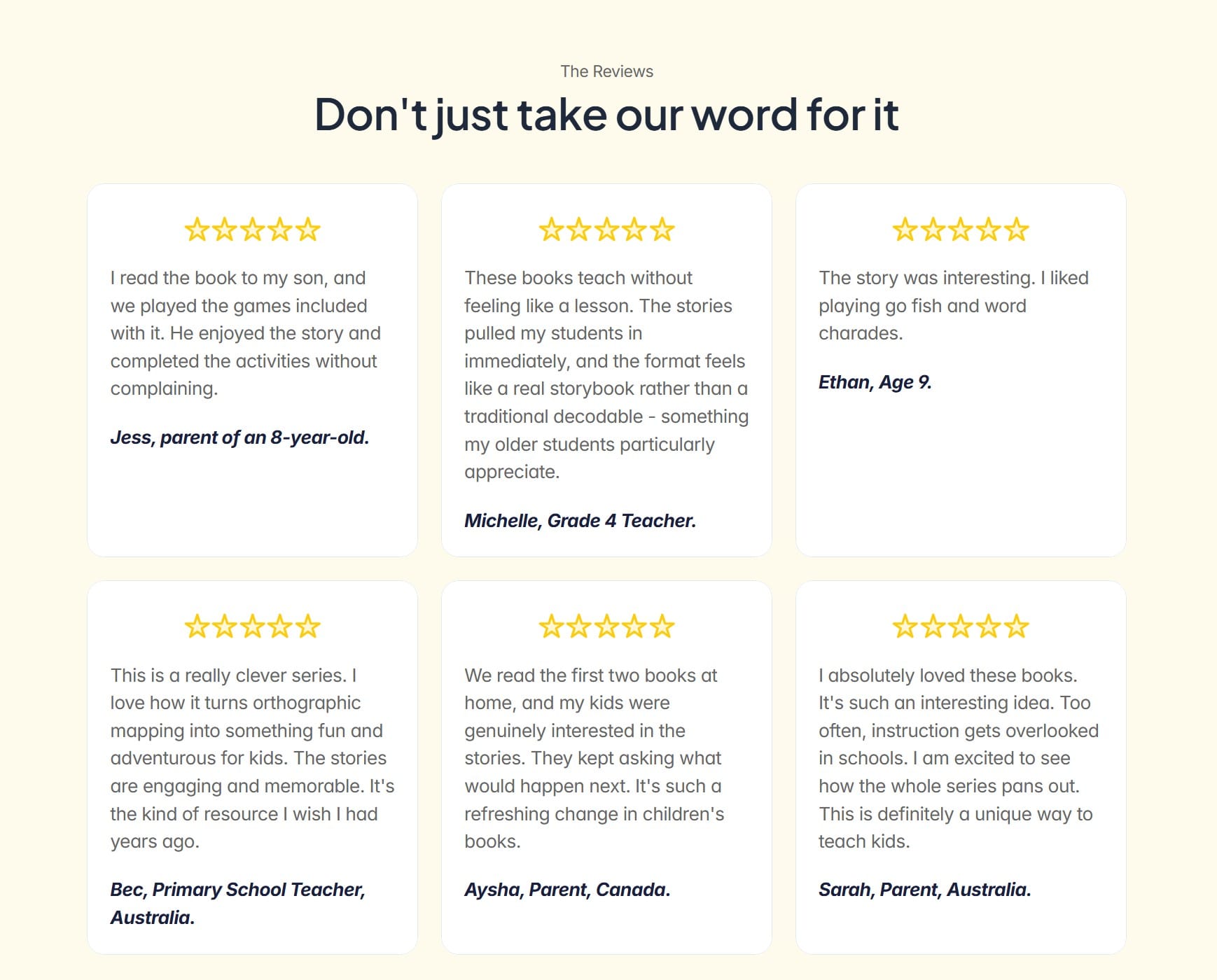
The testimonial section provides reassurance from parents, teachers and children who have used the resources.
I revised the selection so that the reviews support the broader qualities relevant to this product:
- The stories are engaging.
- Children enjoy the activities.
- The books do not feel like conventional lessons.
- The format appeals to older students.
- Children want to continue reading.
This section taught me that a positive testimonial isn't automatically useful.
The review must support the specific product and the page's message.
8. Showing How the Resource Is Used
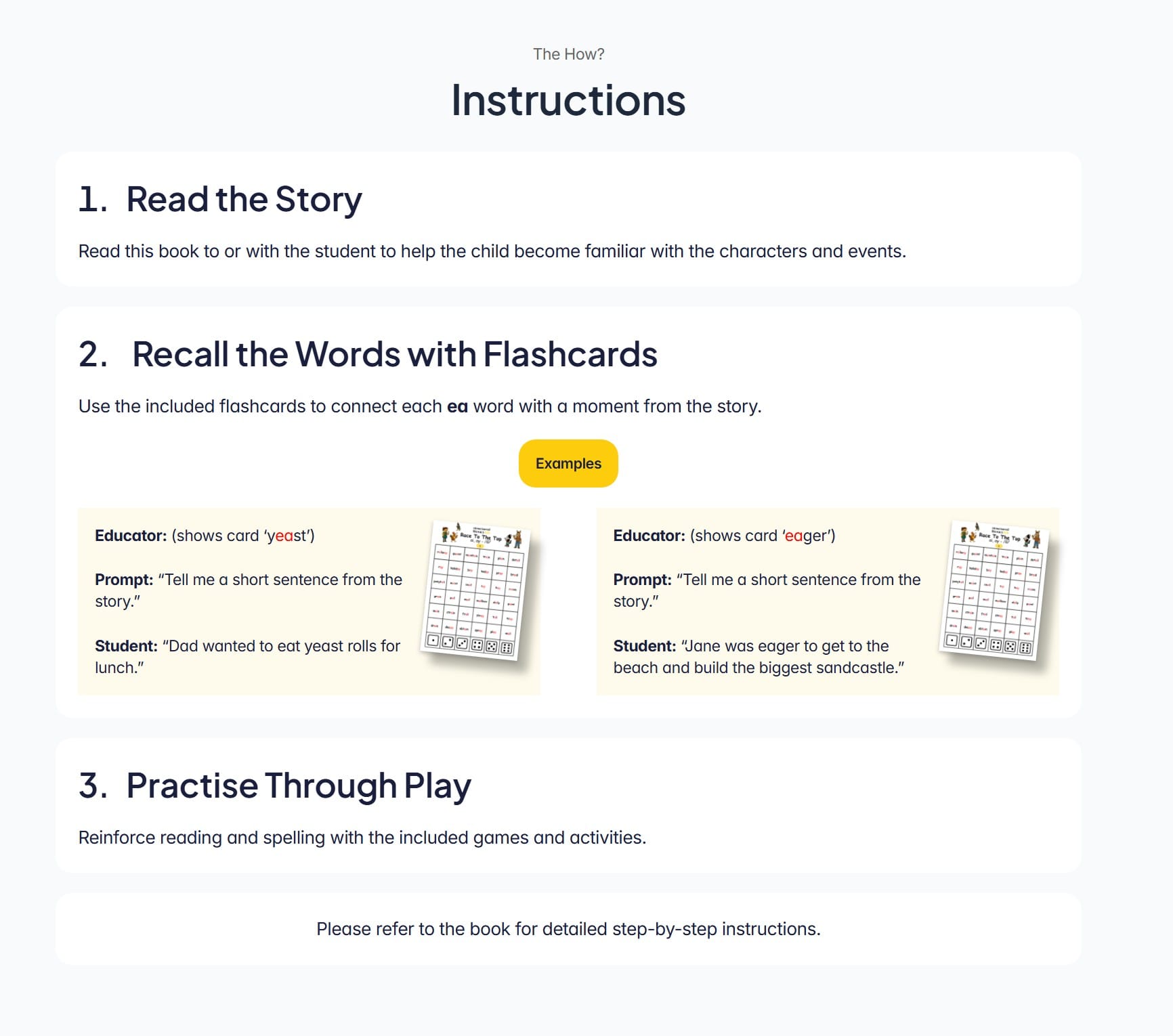
The full book includes detailed instructions, but I didn't want to reproduce them all on the landing page.
Instead, I reduced the process to three steps:
- Read the story.
- Recall the words with flashcards.
- Practise through play.
I added two short educator-and-student examples to demonstrate how the flashcards connect words back to the story.
This is important because “story-based spelling” may be a new idea for some visitors. A brief example makes the method easier to picture.
The detailed instructions remain inside the book, where they will be useful after the resource has been downloaded.
The landing page only needs to show that the method is practical and manageable.
9. Explaining the Intended Outcome
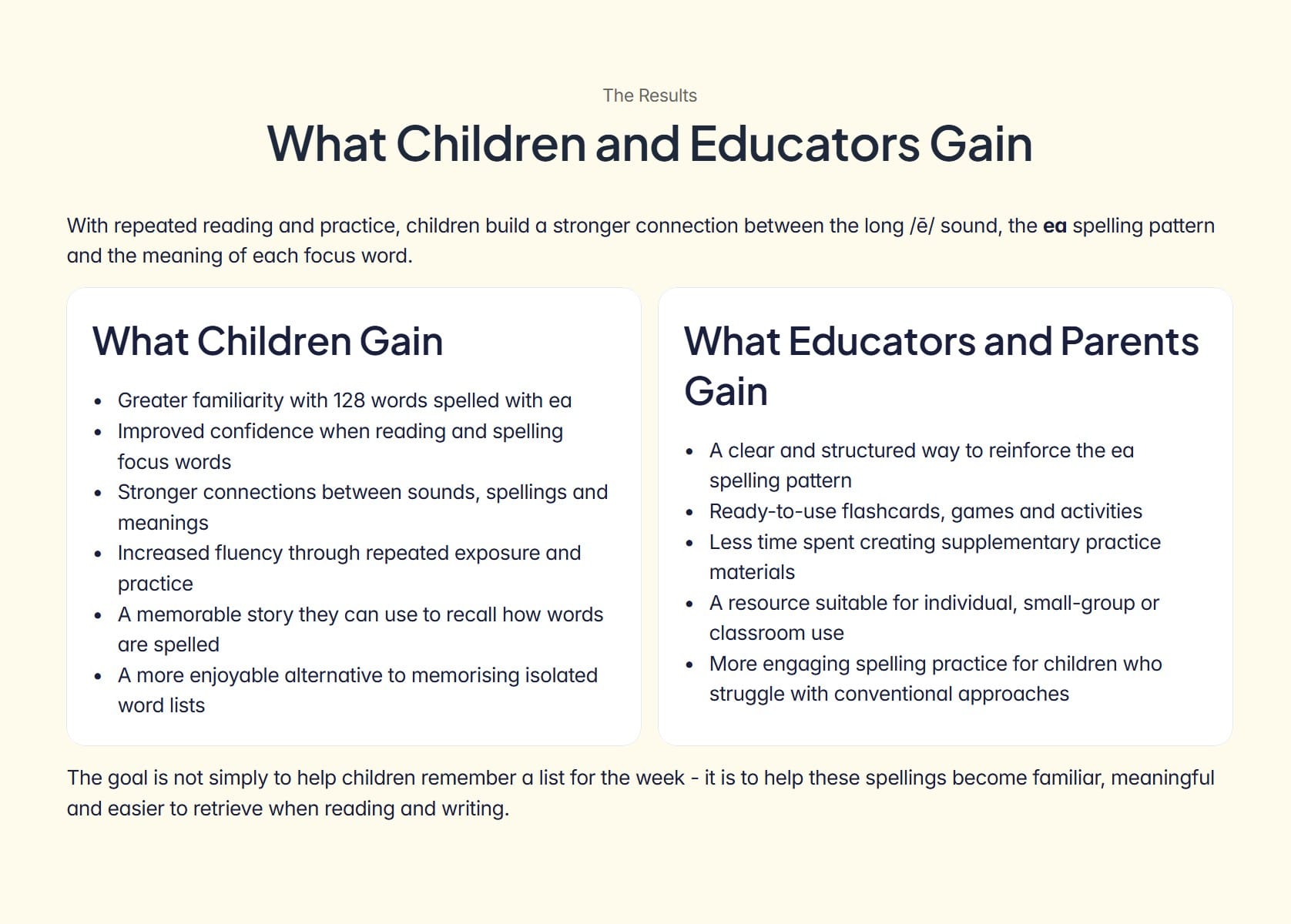
The outcomes section explains what repeated use of the resource is intended to support.
For children, this includes:
- Greater familiarity with the focus words
- Increased confidence when reading and spelling
- Stronger connections between sounds, spellings and meanings
- Improved fluency through repeated exposure
- A story context that supports spelling recall
The page also explains the practical benefits for parents and educators:
- Ready-to-use materials
- Less preparation time
- A structured way to reinforce the spelling pattern
- Activities suitable for different teaching settings
I was careful not to promise that downloading one book would automatically transform a child’s spelling.
The resource provides structured exposure and practice. The outcomes depend on how it is used, how often it is revisited and the individual learner.
The final sentence summarises the intended result:
The goal is not simply to help children remember a list for the week - it is to help these spellings become familiar, meaningful and easier to retrieve when reading and writing.
10. Ending With One Clear Action
The page ends with a second download prompt:
Ready to make ea spellings more memorable?
The visitor has now seen the problem, the method, the contents, the intended audience, the instructions and the outcomes.
At this point, the page should not introduce another concept or direct the visitor towards a different part of the website.
It should simply repeat the intended action:
Download the Book Free
The page begins with this action and ends with the same action.
11. Adapting the Page for Tablets and Phones
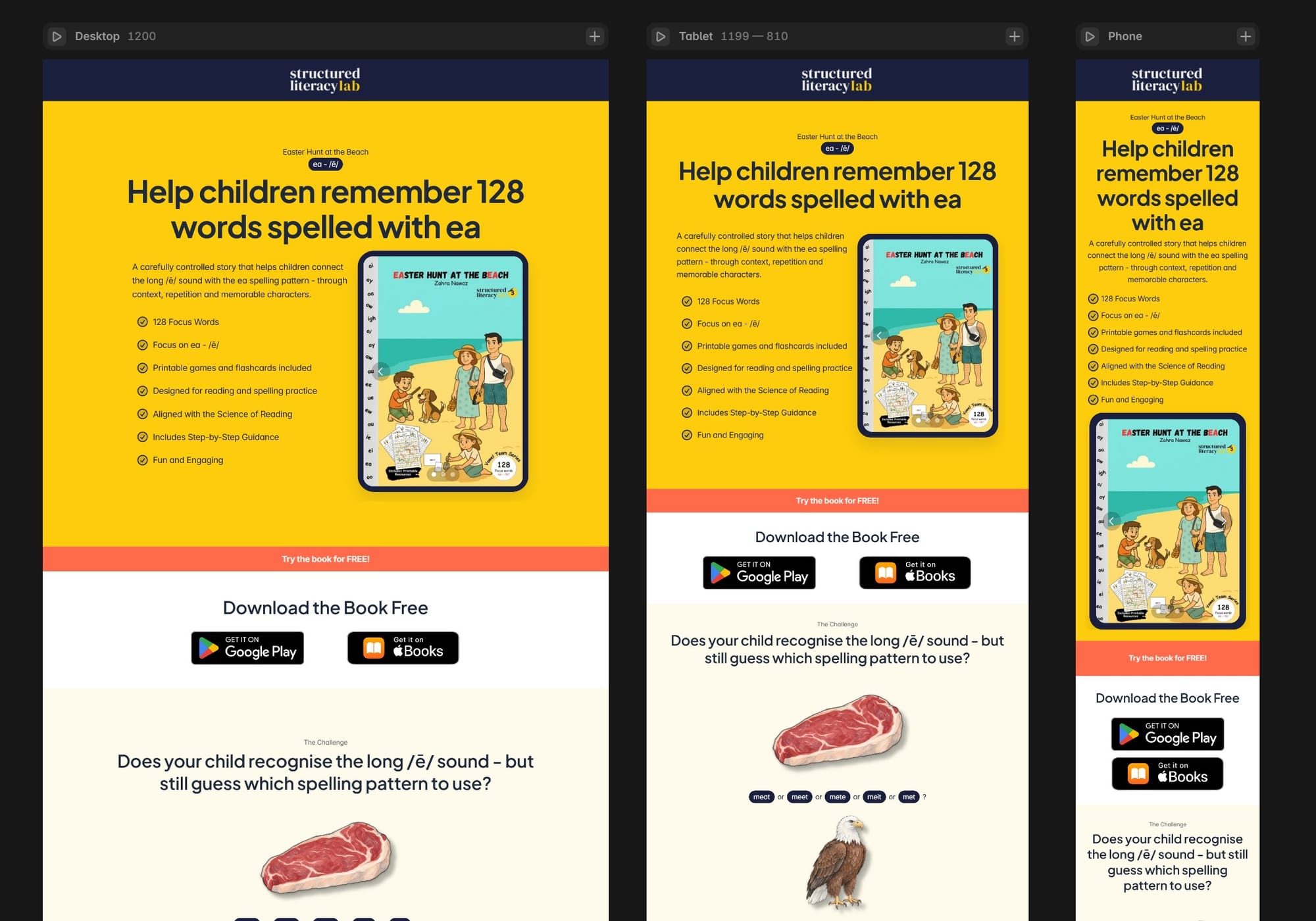
I created separate layouts for desktop, tablet and mobile rather than relying on the desktop page to shrink automatically.
The content remains the same, but its presentation changes.
On wider screens, cards and illustrations can sit side by side. On phones, these elements need to stack vertically so the text stays readable and the illustrations don't get too small.
I paid particular attention to:
- How the hero heading wraps
- The size of the iPad mock-up
- How the feature points stack
- The arrangement of the spelling examples
- The width of content cards
- The length of the audience and outcome sections
- Button size and placement
- Spacing between sections
I also checked the transition between mobile and tablet because a layout that works at 390 pixels may behave differently on a 768-pixel tablet.
Responsive design was not a final cosmetic task. It influenced heading length, the amount of text inside cards, and even the number of items displayed in some sections.
What I Learned From Building This Page
The most time-consuming part wasn't creating frames, stacks, or breakpoints in Framer.
It was deciding what the visitor needed to understand at each stage of the page.
The final structure follows a deliberate sequence:
- This is what the book helps with.
- This is the spelling problem.
- This is how the book addresses it.
- This is what the visitor receives.
- This is who can benefit.
- This is what other users experienced.
- This is how the resource is used.
- These are the intended outcomes.
- This is what to do next.
The page went through many revisions. I shortened sections, replaced examples, removed repetition, corrected hidden component text and reconsidered whether individual testimonials belonged on this particular page.
None of these adjustments dramatically changed the design on its own. Together, they made the page more focused and easier to understand.
Creating a Repeatable Product-Page System
This is the first individual book page for Structured Literacy Lab, but it will not be the last.
The larger objective is to use this page as the foundation for the rest of the Story Spellers collection.
The structure can remain broadly consistent while the following elements change for each book:
- Book title and cover
- Target sound and spelling pattern
- Number of focus words
- Spelling examples
- Illustrations
- Story description
- Included resources
- Testimonials
Spending additional time on the first page should make future pages faster to create and more consistent.
That is one of the principles I am trying to apply across SIMEFF: invest time in creating a system once, then improve and reuse it rather than rebuilding everything from scratch.
Next, I'll connect this landing page to the download process and see how visitors respond.
I will continue documenting what I build, what works and what I change as Structured Literacy Lab develops.
YouTube videos that I used
I watched the following YouTube tutorials several times while learning how to build and adapt the page in Framer:
- Free Framer Crash Course for Beginners 2026 by DesignWithArash
- Approx 2 hours.
- Covers a breadth of topics needed for the landing page.
- This video provides step-by-step instructions, including adaptive responsive layouts for desktop, tablet, and mobile, grid systems and stacks for clean structure, reusable components and design systems, smooth animations and interactions and more.
- The RIGHT Way To Build Footers in Framer (Tutorial) by Ryan Hayward
- Approx 21 minutes.
- I just replicated the exact footer - though it took me 6 hours to do the same.
- The Secret to Responsive Text in Framer by Framer University
- Approx 16 minutes.
- Covers a nice approach to create responsive text sizes based on screens.
- Slide show for the books on the home page
- Desktop video: https://www.youtube.com/watch?v=G_CqECJMf84
- Making it Mobile responsive: https://www.youtube.com/watch?v=QfFRP7BnGTk