
A Simple Expense-Tracking System for Small Independent Businesses
The 30-Second SIMEFF Answer:
At SIMEFF, we manage several independent publishing and digital ventures, including Dystinct and Structured Literacy Lab. This article explains the simple expense-tracking system we developed to keep regular business expenses organised without creating unnecessary administration.
When most of the responsibility for a business sits with you, every administrative task competes with customer work, marketing and delivering what you sell.
You might use employees, contractors, agencies or external consultants. But you are still the person responsible for making sure the expenses are recorded, the receipts can be found and the financial administration does not get out of control.
I have been running businesses for around 20 years, and I currently operate three companies. One thing I have learnt is that a useful business system does not need to be sophisticated. It needs to be clear, reliable and simple enough to maintain as the business grows.
Expense tracking is a good example.
You do not need to create unnecessary bookkeeping work. You need to give every expense one clear path:
Spend -> Capture -> Record -> Review
This guide shows you how to build that system.
By the end of this guide, you will know:
- what information to record
- how to separate business and personal spending
- where to store receipts
- how to maintain your records each week
- how to review spending each month
- how to choose between a spreadsheet, accounting software and other expense-management tools
What Is Business Expense Tracking?
Business expense tracking means keeping an organised record of the money your business spends.
Depending on your business, expenses might include:
- software and subscriptions
- advertising and marketing
- office supplies
- equipment
- website and hosting costs
- phone and internet
- business travel
- professional services
- contractors
- insurance
- banking and payment fees
- education and training
For every expense, you should be able to answer five questions:
- What did I buy?
- When did I buy it?
- Who did I pay?
- How much did I pay?
- Where is the receipt or supporting documentation?
If your system can answer those questions without consuming unnecessary time, it is doing its job.
Do not collect information simply because you can. Record the information that helps you manage the business and meet your accounting, tax and regulatory obligations.
Why Should a One-Person Business Track Expenses?
Tax preparation is an obvious reason to maintain expense records, but it should not be the only reason.
Good expense records help you understand:
- how much it costs to operate your business
- where most of your money is going
- which costs are increasing
- which subscriptions you have forgotten about
- whether particular expenses are still worthwhile
- how much profit the business is actually producing
- whether you have the documents needed for your accountant or tax return
This matters particularly in a one-person business because there may be no finance department monitoring spending for you.
Even when other people help with bookkeeping or administration, you remain responsible for understanding where the business money is going. Other people may help maintain the records, but they may not examine the spending with the same level of interest that you do as the owner.
Across my own businesses, I may outsource particular tasks, but I still need a system that allows me to see what has been spent, find the supporting records and decide whether the spending makes sense. I am also ultimately responsible for ensuring that the records are accurate and available for the business's accounting, tax and reporting obligations.
Expense tracking is therefore more than record-keeping. It gives you visibility over what is happening inside your business.
How Is Expense Tracking Different in a One-Person Business?
A one-person business does not necessarily mean that one person completes every task. You may work with employees, contractors, agencies, bookkeepers or virtual assistants. The difference is that you remain at the centre of the business and are responsible for designing and overseeing the system.
Most expense-tracking advice is written for businesses with finance departments, multiple managers, employees, inventory, and dedicated bookkeepers. As a one-person business, the priority is low administrative overhead and minimal friction.
Maintain accurate, useful records with the least reasonable amount of administration.
| Expense-Management Factor | More complex business | SIMEFF One-Person System |
|---|---|---|
| People involved | Owner, employees and bookkeeper | Owner, sometimes supported by external providers |
| Primary challenge | Coordinating financial activity across the business | Finding time to maintain the system |
| Starting tool | Accounting or finance platform | Spreadsheet or accounting software, depending on need |
| Receipt management | Formal expense-submission process | One designated digital destination |
| Maintenance | Multiple finance processes | One short weekly routine |
| Management review | Departmental or formal reporting | A simple monthly owner review |
| Primary objective | Organisational financial control | Tax readiness, spending visibility and low administrative effort |
A one-person business still needs accurate financial records. The difference is that the system must be simple enough for one busy person to maintain consistently.
Complexity must be earned. Add another tool, field or process only when it solves a genuine problem.
The SIMEFF Expense-Tracking System
A practical expense-tracking system needs six parts:
- Separate business and personal transactions.
- Choose one main expense-management system.
- Record or confirm every expense.
- Use a simple set of categories
- Give every receipt one destination
- Maintain the system with weekly and monthly routines
The tool you choose matters, but it is only one part of the system. A spreadsheet, accounting application or expense-management tool will not keep your records organised unless you use it consistently.
Let's set them up one at a time.
1) Separate Business and Personal Transactions
Wherever practical, use a dedicated business account or payment card for normal business income and spending.
A simple rule helps:
- Personal expense -> Personal account
- Business expense -> Business account
This reduces the number of transactions you must investigate later.
If business and personal spending are mixed, you may need to work through groceries, household bills, personal purchases and business costs every time you update your records.
With a dedicated business account, most transactions are already identifiable as business-related.
There may be occasional exceptions. If you pay a business expense personally, record it correctly and keep the supporting receipt.
The principle is separation - not pretending exceptions never happen.
Every mixed transaction creates another decision you must make later.
2) Choose One Main Expense-Management System
Decide where your main expense record will live.
This could be:
- a spreadsheet such as Excel or Google Sheets
- an accounting software such as Xero, QuickBooks, MYOB or Zoho Books
- a dedicated expense-management application
- an operational tracker such as Smartsheet, monday.com or ClickUp
These tools are not necessarily interchangeable.
Accounting software can provide bank feeds, reconciliation, invoicing, tax records and financial reporting.
Flexible tools such as Smartsheet, monday.com and ClickUp can support custom workflows or project-related expense tracking, but they may not provide the accounting functions or official records for your business needs.
If you use more than one application, decide which contains your main financial record. Avoid creating several conflicting versions of the same information.
If someone else records your expenses, give that person (or team) one recognised system, one receipt location and a clear process to follow.
Outsourcing bookkeeping does not remove the need for a system. It makes a clear system even more important.
Do not begin by asking:
What is the most powerful accounting software available?
Ask:
What is the simplest tool that gives my business the information it needs?
3) Record or Confirm Every Expense
For every expense, record at least:
| Field | Example |
|---|---|
| Date | 7 September 2026 |
| Supplier | Google Ads |
| Description | Landing page promotion |
| Category | Advertising and Marketing |
| Amount | $300 |
| Payment method | Business debit card |
| Receipt status | Saved |
If you use accounting software with automatic bank feeds, you may not need to enter every transaction manually. However, you still need to confirm that transactions have been imported, matched and categorised correctly.
Depending on your location and tax obligations, you may also need to record tax amounts, currency, project, customer or other information.
Start with the fields you genuinely need. You can add more detail when it becomes useful or necessary.
Do not build a $100 solution for a $10 problem.
4) Keep Your Expense Categories Simple
Expense categories help you understand where your business money is going.
A one-person business might begin with categories such as:
- software and technology
- marketing and advertising
- office expenses
- equipment
- website and hosting
- professional services
- contractors
- insurance
- phone and internet
- business travel
- education and training
- banking and payment fees
- other business expenses
Your final categories should reflect your business and local accounting and tax requirements.
Avoid creating categories so detailed that you regularly struggle to choose between them.
For example, you probably do not need separate management categories for:
- software
- online services
- cloud applications
- productivity applications
- digital tools
A single Software and Technology category may provide all the information you need.
Use the simplest categories that still tell you something useful about your spending. Your accountant can help you align them with any applicable tax-reporting requirements.
5) Give Every Receipt One Destination
Receipts become difficult to manage when they are scattered across:
- email inboxes
- wallets
- phone photos
- desk drawers
- download folders
- supplier applications
- vehicle gloveboxes
The solution is to give every receipt one designated destination.
For example, create a cloud folder called:
Business Receipts
Inside it, create one folder for each year and one subfolder for each month:
Business Receipts202601_Jan02_Feb03_Mar04_Apr05_May06_Jun07_Jul08_Aug09_Sep10_Oct11_Nov12_Dec
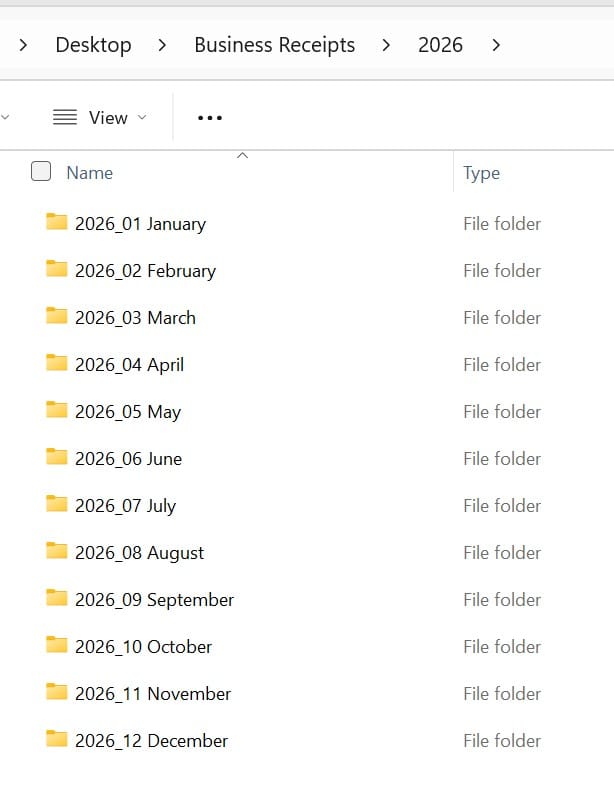
Use a service such as Google Drive, Dropbox or OneDrive if you want the folders to be backed up and available across your devices.
Then follow one rule:
Every business receipt goes to its designated destination.
That destination might be:
- a monthly cloud folder
- an attachment inside accounting software
- a receipt-management application
- a linked document inside an operational tracker
If you use more than one location, define clearly which location is the primary record and how the others connect to it.
- Photograph or scan paper receipts.
- Download PDF invoices.
- Save or print relevant email receipts as PDFs.
- Move downloaded receipts out of your general download folder.
Should You Rename Every Receipt?
Only rename receipts if doing so makes retrieval noticeably easier.
A useful naming format is:
YYYY_MM_DD Supplier_Amount
For example:
2026_09_07 Adobe_73.99.pdf
However, do not turn file naming into another burdensome administrative process. If your accounting system already attaches receipts to transactions, detailed file names may add little value.
Add organisation only when the organisation saves more time than it costs.
6) Maintain the System With Weekly and Monthly Routines
Your expense system needs two recurring maintenance points:
- a short weekly routine to keep the records complete
- a monthly review to understand the spending and make decisions
The weekly routine protects the accuracy of the records. The monthly review turns those records into useful business information, based on which, you can make informed business decisions.
Weekly 15-Minute Friday Expense Routine
A good expense system will still fail if you do not maintain it.
The easiest way to prevent a backlog is to schedule a short recurring appointment with yourself.
For example: Every Friday at 4:45 PM - 15 minutes
Complete these five steps:
| Step | Action | Suggested Time |
|---|---|---|
| 1 | Review the week's transactions | 3 minutes |
| 2 | Confirm or record the expenses | 4 minutes |
| 3 | Save and match receipts | 3 minutes |
| 4 | Review expense categories | 3 minutes |
| 5 | Investigate anything unusual | 2 minutes |
The way you complete these steps depends on your tool.
- With a spreadsheet, compare the bank transactions with the rows in the tracker.
- With accounting software, review the imported transactions and suggested matches.
- With an expense-management application, check captured receipts and uncategorised items.
- With a flexible tracking tool, confirm that all transactions have reached the system.
Fifteen minutes is a practical target for a straightforward business - not a guarantee for every business.
The purpose is to stop several small jobs from accumulating into one large and unpleasant job.
For the complete step-by-step process, read:
The 15-Minute Friday Expense Routine for One-Person Businesses
Don't rely on remembering the routine. Give it a fixed place in your calendar.
Review Your Expenses Once a Month
Recording expenses tells you what happened. Reviewing them helps you decide what to do next.
Once a month, set aside approximately 30 minutes to review your spending.
Ask the following questions:
Where did most of the money go? Look at your largest categories and individual expenses. Does the pattern make sense for the way you operated the business that month?
Which expenses increased? Identify significant changes. Determine whether each increase was planned, necessary or unexpected.
What am I paying for but rarely using? Review recurring subscriptions, memberships and services. Cancel, downgrade or pause anything that is no longer producing sufficient value.
Which expenses are producing value? The goal is not always to spend less. An expense that costs $1,000 but helps generate $10,000 may be more valuable than a $49 subscription that no one uses.
Ask whether each significant expense:
- saves meaningful time
- helps generate revenue
- improves customer delivery
- reduces risk
- supports an important business requirement
Did anything surprise me? Investigate unfamiliar charges, duplicated payments, unexpected fees and expenses that do not fit the normal pattern.
What should change next month? Finish the review by choosing one or two action items. For example:
- cancel an unused subscription
- reduce unnecessary advertising expenditure
- move a recurring payment to the business account
- ask a supplier about an unexpected increase
- create a budget for an upcoming annual renewal
The objective is not to produce an impressive financial report. It is to understand what you are spending and whether the spending is worthwhile.
Which Expense-Tracking Tool Should You Use?
The right tool depends on the problem you need to solve.
I started my first business with an Excel spreadsheet. It worked because the finances were straightforward and the transaction volume was manageable.
As the business grew, manually copying transactions from bank statements became cumbersome. I moved to Xero because automatic bank feeds and reconciliation solved a problem I was actually experiencing.
Today, I use different tools across my businesses, including Xero, Zoho Books and Smartsheet. Each serves a different purpose.
| Type of tool | Examples | Useful when |
|---|---|---|
| Spreadsheet | Excel, Google Sheets | Your finances are straightforward and manual work remains manageable |
| Accounting software | Xero, QuickBooks, MYOB, Zoho Books | You need bank feeds, reconciliation, invoicing or financial reporting |
| Expense-management software | Dedicated receipt and expense applications | You need receipt capture, reimbursements or expense approvals |
| Flexible tracking tool | Smartsheet, monday.com, ClickUp, Airtable | You need custom workflows or expenses linked to projects and operational work |
Flexible work-management tools are not automatically substitutes for accounting software. They may not provide bank reconciliation, accounting ledgers, tax reports or financial statements.
You might use one for operational tracking while keeping the financial record in accounting software.
Consider changing tools when:
- manual entry is consuming too much time
- transactions are regularly missed or duplicated
- automatic bank feeds would save meaningful effort
- invoices need to be raised regularly
- receipt matching has become difficult
- tax reporting has become more complicated
- your accountant or bookkeeper needs direct access
- the current system is becoming difficult to maintain
A business with 20 complicated transactions may benefit from accounting software. Another business with 100 simple transactions may still maintain an effective spreadsheet.
Ask:
What is difficult about my current system, and will different software solve that problem?
Do not buy software simply because other business owners use it.
Choose a tool based on the problem it solves - not how many features it offers.
Automate Repetitive Tasks - When It Is Worthwhile
Automation can reduce the repetitive work involved in expense management.
For example, as the number of transactions in one of my businesses increased, manually checking bank statements and copying transactions into a tracker became cumbersome.
I reached the point where I wanted the transactions to be imported automatically. That was a clear sign that the existing system was creating a genuine problem.
I moved from Excel to online accounting software with automatic bank feeds. Once the system was in place, I could also use it to create invoices, track payments and maintain more complete financial records.
However, moving to accounting software also introduced two costs:
- the recurring subscription cost
- the initial time and effort required to configure the software and update the process
The question is: will the ongoing benefits outweigh these costs?
Automation can support the system, but it does not remove the need for review. Imported transactions, suggested categories and automatic receipt matches can still be incorrect.
Depending on your tools, you may be able to automate:
- importing bank transactions
- identifying regular suppliers
- suggesting expense categories
- forwarding email receipts
- matching receipts to transactions
- recording recurring expenses
- producing monthly summaries
However, automation takes time to set up and maintain.
It is easy to spend three hours building an automation that saves five minutes a month.
Some work may be better delegated than automated.
For example, a bookkeeper may be able to review transactions, match receipts and resolve unusual items more reliably than a complicated automation.
Whether the work is completed by you, software or another person, the system should make clear:
- what needs to be done
- when it should be done
- where the information is stored
- how you will know it has been completed
This is the SIMEFF approach: simplify first, then decide whether to do, delegate or automate the work.
Technology should reduce your workload. It should not become another hobby your business has to support.
7 Common Expense-Tracking Mistakes
- Waiting until Tax Time
Reconstructing months of spending from old transactions is far harder than maintaining your records as you go. - Mixing Personal and Business Spending
Every mixed transaction creates another decision you have to make later. It delays the reconciliation process. - Creating Too Many Categories
More detailed does not always mean more useful. Start with broad categories and add detail only when it helps your reporting needs. - Keeping Receipts in Several Places
Give every receipt one designated destination. - Recording Expenses but Never Reviewing Them
A perfectly maintained spreadsheet is of limited value if you never look at what it is telling you. - Buying Software Before Understanding the Problem
Identify what is difficult about your current system before paying for another tool. - Making the System Too Difficult to Maintain
This may be the biggest mistake of all.
A perfect system that you abandon after a few weeks is worse than a basic system you maintain for three years.
Note: There is no permanently perfect system. Your needs will evolve, and your expense system should evolve with them.
The Complete SIMEFF Expense Routine
The complete system has three levels:
When You Spend: Capture
- Use the business account where practical.
- Make the transaction easy to identify.
- Save the receipt to its designated destination.
Every Friday: Record
- Review the transactions.
- Confirm imported transactions or record missing expenses.
- Match and save receipts.
- Categorise expenses.
- Investigate anything unusual.
Every Month: Review
- Look at where the money went.
- Identify significant increases.
- Review subscriptions and recurring charges.
- Assess whether major expenses are producing value.
- Decide what should change.
This creates a simple expense-management rhythm:
Capture -> Record -> Review
You can automate or expand the system when your needs become more complex.
Until then, keep it simple enough to maintain and effective enough to give you control.
I have been building and running businesses for around 20 years. I currently operate three companies using a combination of employees, contractors, technology and external specialists.
I have made enough mistakes to learn that a good system does not need to be complicated. It needs to make responsibilities clear, keep information easy to find and continue working when the business grows.
That is what this expense system is designed to do.
- Shaf Azam, Founder of SIMEFF
Frequently Asked Questions
What is the easiest way to track business expenses?
Use a dedicated business account, record expenses in one spreadsheet or accounting platform, save receipts in one designated location and update the records every week. The easiest system is the one that gives you the relevant information when you need it without creating unnecessary admin work.
Can I track business expenses with a spreadsheet?
Yes. A spreadsheet may be sufficient when your transaction volume is relatively low, your finances are straightforward and you can maintain the records consistently. Consider accounting software when manual work, invoicing, bank reconciliation, tax reporting or collaboration with an accountant becomes difficult.
What information should I record for each expense?
At a minimum, record the date, supplier, description, category and amount. You should also know which account was used and where the receipts or supporting documents are stored. Additional requirements may apply depending on your country, tax system and business structure.
Should I use a separate bank account for business expenses?
Where practical, use a dedicated account or payment card for business activity. Separating business and personal transactions reduces sorting and makes records easier to manage and maintain. Accounting requirements vary by country and business structure, so check any rules that apply to you.
How long should I keep business receipts?
The rules vary by country, business structure and type of record. Check the requirements published by your local tax authority or confirm them with a qualified accountant.
When should I review business subscriptions?
Review recurring charges monthly or quarterly. Look for applications, memberships and services that you no longer use or that no longer provide sufficient value.
Put This System Into Practice
Download the free SIMEFF Expense Tracker for Friday Checklist for One-Person Businesses.
It includes:
- a ready-to-use expense spreadsheet
- editable expense categories and dropdown lists
- the 15-minute Friday checklist
- a monthly expense review
- practical setup instructions
Use the spreadsheet as your main tracker if your finances are straightforward.
If you already use Xero, QuickBooks, MYOB, Zoho Books or another application, you do not need to replace it. Use the checklist and monthly review to create a consistent routine inside your existing system.
Just a straightforward way to organise your business expenses - and keep them organised.
Continue Building Your Expense System
You do not need to organise every part of your business at once.
Begin with one recurring problem - in this case, expenses and receipts. Put a simple system in place, use it consistently and improve it only when your needs change.
Once this part of the business is under control, move on to the next.
That is the SIMEFF approach:
One useful system at a time.
Simple enough to use. Effective enough to matter.
Related Reading:
More SIMEFF expense-management guides are coming soon.