
The 15-Minute Friday Expense Routine for Small Businesses
To run this routine weekly, download our Free Expense Tracker & Friday Checklist (.XLSX).
The 30-Second SIMEFF Answer:
This routine was created as a practical way to prevent receipts and business expenses from accumulating across the week. It is one of the small administrative systems we use to keep SIMEFF’s projects organised.
Run the 15-Minute Routine at 4:45 PM every Friday - ideally as a recurring 4:45 PM calendar appointment - to review the week’s business transactions, confirm that they have been recorded, save or match receipts, check the categories and investigate anything unusual.
Step 1 - Review the Week's Transactions (3 minutes)
Step 2 - Confirm or Record the Expenses (4 minutes)
Step 3 - Save and Match the Receipts (3 minutes)
Step 4 - Review the Expense Categories (3 minutes)
Step 5 - Investigate Anything Unusual (2 minutes)
You can do this using a spreadsheet, accounting software, an expense management application or any other suitable business tool. The tool may change, but the routine remains the same.
When small expense-tracking tasks go unfinished, they gradually become a large bookkeeping job.
A receipt stays in your email. A business purchase made with your personal card is not recorded. A transaction appears on your bank statement under a name you don’t recognise.
None of these problems feels particularly urgent at the time.
Then the end of the month arrives… or worse, the end of the financial year - and you have to work out what happened.
I have dealt with this in my own businesses. In my first business, I started tracking expenses in an Excel spreadsheet. As the number of transactions increased, manually copying information from bank statements became cumbersome, so I moved to Xero.
Today, I use different tools across my businesses, including accounting software such as Xero and Zoho Books and flexible project management tools such as Smartsheet and ClickUp. The tools vary, but the underlying routine is remarkably similar.
Every week, I still need to know:
- Have all the transactions been captured?
- Are the descriptions and categories correct?
- Can the supporting receipts be found?
- Is there anything unusual that needs attention?
That is what this Friday routine is designed to answer.
Here is the complete routine:
| Step | Action | Suggested Time |
|---|---|---|
| 1 | Review the week's transactions | 3 minutes |
| 2 | Confirm or record the expenses | 4 minutes |
| 3 | Save and match receipts | 3 minutes |
| 4 | Review expense categories | 3 minutes |
| 5 | Investigate anything unusual | 2 minutes |
The exact time will depend on your transaction volume, tools, and business complexity. Fifteen minutes is a practical target for a straightforward one-person business - not a guarantee for every business.
Why Do This on Friday?
Friday provides a natural time to close out the financial week.
The transactions are still recent. You are more likely to remember:
- what you purchased
- why you purchased it
- which customer or project it related to
- how you paid for it
- where the receipts were sent
- whether an unfamiliar charge is legitimate
If you wait until the end of the month, those questions get harder to answer.
If you wait until tax time, expense tracking can turn into detective work.
Friday is only a suggested trigger. If Tuesday morning or Sunday evening suits your business better, use that time instead.
The important thing is to choose a regular time and make the routine easy to repeat.
The best routine is not the one that looks most efficient on paper. It is the one you can maintain consistently.
What Time Should You Do the Friday Expense Routine?
A good default is:
Every Friday at 4:45 PM - 15 minutes
This worked well for me because it created a clear end-of-week trigger for me. Before closing the laptop, review the transactions, deal with the receipts and make sure that nothing important has been left unresolved.
Add a recurring appointment to your calendar:
Event: SIMEFF Friday Expense Routine
Time: Friday, 4:45 - 5:00 PM
Repeat: Every week
Reminder: 10 minutes before
Include links to the following in the meeting calendar invite description:
- business bank account
- expense tracker or accounting software
- receipt folder
- Friday checklist
This removes the need to search for everything when the reminder appears.
If 4:45 PM doesn't work for you, then choose another time.
The exact time is less important than attaching the routine to a reliable weekly trigger.
Don't rely on remembering the routine. Give it a fixed place in your calendar.
Which Tool Should You Use?
The Friday routine doesn't depend on any one application.
You can use a spreadsheet, accounting software, an expense-management application or a flexible work-management tool. The right choice depends on what you need the system to do.
| Type of tool | Examples | Best suited to |
|---|---|---|
| Spreadsheet | Excel, Google Sheets | Straightforward expenses and relatively few transactions |
| Accounting software | Xero, QuickBooks, MYOB, Zoho Books | Bank feeds, reconciliation, invoicing, tax records and financial reporting |
| Expense-management software | Dedicated receipt and expense applications | Receipt capture, expense approvals and reimbursements |
| Flexible tracking tool | Smartsheet, monday.com, ClickUp, Airtable | Custom workflows, project-related expenses and operational tracking |
These tools are not necessarily interchangeable.
Spreadsheets
A spreadsheet gives you flexibility and control. It may be all you need if your finances are straightforward and you have relatively few transactions.
However, most spreadsheet-based systems require more manual work. I had to copy transactions, check for duplicates and maintain formulas myself.
Accounting software
Applications such as Xero, QuickBooks, MYOB and Zoho Books can import bank transactions, match receipts, reconcile accounts, create invoices and generate financial reports.
They can reduce manual entry, but they also introduce subscription costs, setup work and additional features you may need to learn.
Expense-management software
Expense-management applications can be useful when several people make purchases, submit receipts, or request reimbursements.
A one-person business might also use one for easier receipt capture or automatic data extraction. However, you should check how the application connects with your accounting records.
Flexible work-management tools
Smartsheet, monday.com, ClickUp and similar platforms can be adapted to track expenses. This may be useful when expenses need to connect to projects, customers, approvals, or other operational work.
However, these are not primarily accounting applications.
They may not provide:
- proper bank reconciliation
- accounting ledgers
- tax reports
- financial statements
- accounting controls
- direct access for your accountant
You might use one of these platforms as an operational tracker while keeping the official financial records in accounting software.
Choose a tool based on the problem it solves - not how many features it offers.
What You Need Before You Begin
Whatever tool you use, the Friday routine needs five basic elements:
| What you need | Possible options |
|---|---|
| A source of transactions | Bank account, card or payment platform |
| One main expense record | Spreadsheet, accounting software or expense application |
| A receipt destination | Cloud folder or attachments inside your accounting system |
| Consistent categories | A short category list appropriate for your business |
| A weekly trigger | A recurring calendar appointment |
If you haven't established these foundations, start with:
How to Track Business Expenses: A Simple System for One-Person Businesses
Once the basic system is in place, complete the following five steps each week.
Step 1: Review the Week's Transactions
Suggested time: 3 minutes
Start with the source of the transactions.
Depending on your business, this might include:
- your business bank account
- your business debit or credit card
- PayPal, Stripe or another payment platform
- cash purchases
- business expenses paid personally
- purchases made by an employee or contractor
Review the transactions from the previous seven days.
Ask:
- Do I recognise this transaction?
- Was it for the business?
- Has it reached my tracker/accounting system?
- Do I have the receipt or invoice?
- Was anything paid through a different account?
The way you complete this step will depend on your tool.
If you use a spreadsheet
Open your bank account or download the week’s transactions. Compare them with the entries in your spreadsheet.
If you use accounting software
Open the bank-feed or reconciliation screen. Check that the transactions have been imported correctly.
If you use an expense-management application
Check the list of captured and uncategorised expenses. Confirm that expected transactions are present.
If you use a flexible tracking tool
Compare the entries in your expense board or table with the original bank or card transactions. Unless you have a reliable integration, don’t assume every transaction has been imported.
At this point, you are identifying what happened - not deciding whether every expense was a good business decision.
That comes later.
Step 2: Confirm or Record the Expenses
Suggested time: 4 minutes
Make sure you've recorded each transaction in your main system.
At a minimum, you should be able to identify:
| Field | Example |
|---|---|
| Date | 7 September 2026 |
| Supplier | Google Ads |
| Description | Landing Page Promotion |
| Category | Advertising and Marketing |
| Amount | $300 |
| Payment method | Business debit card |
| Receipt status | Saved |
Depending on your business and local requirements, you may also record:
- applicable tax
- currency
- exchange rate
- project or customer
- notes
- receipt link
- reimbursable status
- approval status
If you use a spreadsheet
Add transactions that are missing. Check that the dates, amounts and descriptions match the original bank records.
Be careful with copied formulas and duplicated entries.
If you use accounting software
Confirm or reconcile imported bank transactions. Review any suggested matches or categories rather than accepting them automatically.
Automation can save time, but it can also repeat a mistake very efficiently.
If you use an expense-management application
Check that automatically extracted information is correct. Receipt-scanning tools can misread dates, tax amounts and supplier names.
If you use a flexible tracking tool
Make sure the required fields are complete and that every expense has reached the system. If the tool feeds information into accounting software, check that the transfer or integration worked.
Automation can enter information for you. It cannot remove your responsibility for checking it.
What if you paid personally?
Occasional exceptions happen.
If you paid a business expense from a personal account:
- record the expense
- identify how it was paid
- save the receipt
- record any reimbursement, owner contribution or payment from personal funds correctly for your business structure
If you are unsure about the accounting treatment, confirm it with your accountant.
Step 3: Save and Match the Receipts
Suggested time: 3 minutes
Check whether each transaction has the necessary invoice, receipt, or supporting record.
You might have received the receipts as:
- email attachments
- downloadable PDFs
- paper receipts
- photos
- invoices stored in supplier accounts
- payment-platforms
Where you save them depends on your system.
If you use a spreadsheet
Save the documents in a cloud folder. If useful, include a link to the receipt in the spreadsheet.
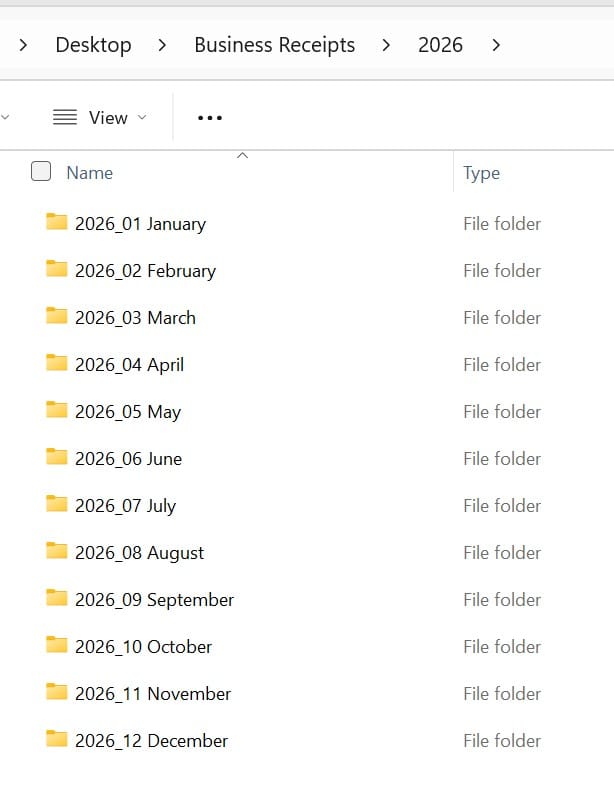
A simple structure is:
Business Receipts202601_Jan02_Feb03_Mar04_Apr05_May06_Jun07_Jul08_Aug09_Sep10_Oct11_Nov12_Dec
If you use accounting software
Attach the document directly to the relevant transaction when the software supports it.
You may still choose to keep a separate document archive, depending on your backup process and record-keeping requirements.
If you use an expense-management application
Check that the receipt image is readable and linked to the correct expense.
If you use a flexible tracking tool
Attach the receipt to the relevant entry or include a link to its cloud-storage location. Make sure attachments remain accessible to anyone responsible for bookkeeping or accounting.
The important principle is the same:
Every receipt should have one predictable destination.
Should you rename every receipt?
Only if renaming makes it easier to identify.
A useful format is:
YYYY_MM_DD Supplier_Amount
Example: 2026_09_09 Adobe_73.99.pdf
Add organisation only when the organisation save more time than it costs.
Step 4: Review the Expense Categories
Suggested time: 3 minutes
Check that each expense has an appropriate category.
Common categories for a one-person business might include:
- software and technology
- marketing and advertising
- office expenses
- equipment
- website and hosting
- professional services
- contractors
- insurance
- phone and internet
- business travel
- education and training
- banking and payment fees
- other business expenses
Please ensure your categories match your applicable accounting and tax requirements.
Don’t trust automatic categories without checking
Accounting and expense-management software may suggest a category based on previous transactions.
That can be useful, but the suggestion may be wrong.
A supplier can provide several different products or services. A payment to the same supplier may not always belong in the same category.
Keep categories consistent across tools
If you use Smartsheet or monday.com alongside accounting software, use matching category names where practical.
For example, avoid calling the category:
- Digital Tools in one system
- Software in another
- Online Services in a third
Inconsistent names make reports and comparisons harder to understand.
What if you don't know the correct category?
Create a temporary category such as:
Unclear - Review
Add a note and return to it later, or ask your accountant.
Don't allow one uncertain transaction to consume the entire routine.
Step 5: Investigate Anything Unusual
Suggested time: 2 minutes
Use the final two minutes to identify anything that requires attention.
Look for:
- unfamiliar transactions
- duplicate charges
- missing receipts
- incorrect amounts
- failed payments
- unexpected bank or payment fees
- refunds that haven’t arrived
- subscriptions you thought were cancelled
- personal expenses paid from the business account
- business expenses paid personally
- transactions that failed to import
- incorrect automatic matches
Resolve simple issues immediately.
If something requires more time, give it a clear next action.
For example:
- download the missing invoice
- ask the supplier about a duplicate charge
- confirm whether a refund was processed
- check the transaction with your accountant
- correct an automatic category
- reconnect a failed bank feed
- investigate a broken integration
The goal isn't to resolve every problem within 15 minutes.
The goal is to ensure every unresolved issue has a next action.
Your Friday Routine by Tool
Here is how the routine changes depending on what you use:
| Step | Spreadsheet | Accounting software | Flexible tracking tool |
|---|---|---|---|
| Review | Compare bank activity with spreadsheet entries | Review imported bank transactions | Compare entries with original transactions |
| Record | Enter missing transactions manually | Confirm or reconcile imported transactions | Add or import missing entries |
| Receipts | Save in a cloud folder and optionally link | Attach to the relevant transaction | Attach or link to the relevant item |
| Categories | Select from your category list | Check suggested accounting categories | Apply consistent labels or fields |
| Exceptions | Add issues to a follow-up list | Review unmatched or unusual transactions | Check incomplete items and failed integrations |
The buttons and screen names may be called differently between applications.
However, our expected outcome remains the same:
Every transaction is identified, recorded, supported and reviewed.
The Complete Friday Expense Checklist
Review
☐ Open the primary source of business transactions.
☐ Review the previous seven days.
☐ Check any secondary business payment methods.
☐ Identify business expenses paid personally.
☐ Confirm that every transaction is familiar.
Record or reconcile
☐ Add missing expenses.
☐ Confirm imported transactions.
☐ Check dates, suppliers and amounts.
☐ Review automatic matches.
☐ Add clear descriptions where needed.
File
☐ Download missing invoices.
☐ Save email receipts.
☐ Photograph or scan paper receipts.
☐ Attach or link receipts to transactions.
☐ Confirm that saved documents are readable.
Categorise
☐ Review expense categories.
☐ Check automatically suggested categories.
☐ Flag uncertain expenses for review.
☐ Keep category names consistent.
Resolve
☐ Investigate unfamiliar charges.
☐ Check duplicates, refunds and failed payments.
☐ Look for failed imports or integrations.
☐ Add unresolved issues to a follow-up list.
☐ Close the tracker or accounting application.
Once the checklist is complete, stop.
There is no need to turn a 15-minute routine into an open-ended finance session.
What Not to Do Every Friday
The weekly routine is intended for maintenance - not detailed financial analysis.
You don’t normally need to do all of the following every week:
- redesign your spreadsheet
- rebuild your category structure
- compare several months of expenditure
- evaluate every subscription
- prepare detailed financial reports
- research different accounting applications
- build new automations
- analyse the value of every expense
Those activities may occasionally be useful, but they shouldn’t become part of your standard Friday routine.
If you overload the routine, it becomes harder to maintain.
A recurring system should contain only the work that genuinely needs to recur.
What If It Takes Longer Than 15 Minutes?
Don’t treat 15 minutes as a strict limit or a measure of success.
If the routine regularly takes longer, identify the source of the delay.
Too many transactions are missing
Record expenses closer to the time of purchase or consider using automatic bank feeds.
Receipts are difficult to find
Give every receipt one destination and save it when it arrives.
Transactions are spread across several accounts
Use one primary business account or card wherever practical.
Categories are confusing
Reduce the number of categories and clarify how to use each one.
Your spreadsheet requires too much manual work
Consider accounting or expense-management software with bank feeds and receipt matching.
This was the point I reached in my first business. Excel wasn’t the problem. It had simply stopped being the most efficient tool for the job.
Your software has become too complicated
Turn off unnecessary features, simplify the workflow or consider whether the tool still suits the business.
More software isn’t always the answer.
You have a high volume of transactions
Consider more frequent processing, better automation or support from a bookkeeper.
The objective is not to force the activity into exactly 15 minutes.
The goal is to create a short, predictable process that keeps financial administration from getting out of control.
What If You Miss a Friday?
Missing one week doesn’t mean the system has failed.
Complete the routine at the next reasonable available opportunity. When I miss a Friday, I review the missed period and then return to my normal schedule.
If you regularly miss the routine, ask why:
- Is Friday a bad day?
- Is the reminder easy to ignore?
- Does the routine contain too many steps?
- Are your files or applications difficult to access?
- Has the transaction volume increased?
- Are you relying on memory instead of capturing information when you spend?
Adjust the system rather than abandoning it.
A simple Tuesday routine you complete is better than a Friday routine you continually miss.
Should You Do It, Delegate It or Automate It?
When I build a process in one of my businesses, I eventually ask three questions:
- Should I continue doing this myself?
- Can software handle part of it?
- Would another person handle it better?
The same applies to expense tracking.
Continue doing it yourself when:
- the routine is quick
- you want direct visibility over spending
- the transaction volume is manageable
- delegating it would create more work than it saves
Automate parts of it when:
- transactions can be imported reliably
- receipts can be forwarded automatically
- recurring suppliers can be identified
- automatic matching saves meaningful time
- the automation is easy to check and maintain
Delegate parts of it when:
- transaction volume has increased
- bookkeeping requires specialist knowledge
- unresolved items consume too much time
- another person can perform the work more reliably
You can delegate the task, but you remain responsible for the system.
Make sure everyone involved knows:
- what needs to be done
- when it should be completed
- where the information belongs
- how questions should be raised
- how you will know the work has been completed
Simply first. Then decide whether to do, delegate or automate the work - or use a sensible combination of the three.
Add a Monthly Expense Review
The Friday routine keeps your records organised.
A monthly review helps you use those records to make decisions.
Once a month, spend approximately 30 minutes asking:
- Where did most of the money go?
- Which expenses increased?
- Were those increases intentional?
- What am I paying for but rarely using?
- Which expenses are producing value?
- Did anything surprise me?
- What should change next month?
Review subscriptions and recurring charges during the monthly session instead of checking every subscription each Friday.
The two routines have different purposes:
| Routine | Purpose |
|---|---|
| Weekly | Keep transactions and receipts organised |
| Monthly | Understand spending and make decisions |
Recording tells you what happened.
Reviewing helps you decide what to do about it.
Frequently Asked Questions
Can I use this routine with Xero, QuickBooks, MYOB or Zoho Books?
Yes. Use the bank-feed or reconciliation screen to review imported transactions, check suggested matches, attach receipts and flag anything that needs attention.
Screen names and features will vary by application, but the five-step routine stays the same.
Can I use the routine with Excel or Google Sheets?
Yes. Compare the transactions in your bank account with the entries in your spreadsheet. Add anything missing, check the categories and save the supporting receipts in one designated location.
A spreadsheet may be enough when your finances are straightforward and the manual work remains manageable.
Can I track expenses in Smartsheet, monday.com or ClickUp?
Yes, these tools can be configured to track expenses, receipts, projects and approval workflows.
However, they aren’t primarily accounting applications. They may not provide formal bank reconciliation, tax reporting, accounting ledgers or financial statements.
Use them for operational tracking where appropriate, while making sure your official financial records meet the requirements that apply to your business.
Do I need accounting software?
Not necessarily.
Accounting software becomes useful when features such as bank feeds, invoicing, transaction matching, financial reporting and accountant access save meaningful time or help you meet your obligations.
Choose it because it solves a real problem - not because every business is supposedly expected to use it.
Does the routine have to be completed on Friday?
No. Friday is a convenient end-of-week trigger, but you can choose any day that fits your business.
Use the same day and time each week so the routine becomes predictable.
Is 15 minutes enough for every one-person business?
No. Fifteen minutes is a practical target for a business with relatively straightforward expenses.
It may take longer if you have many transactions, multiple accounts, complicated requirements or missing documentation.
Should I record expenses immediately or wait until Friday?
Capture receipts when you spend whenever possible.
You can record transactions immediately or use the Friday routine to confirm that everything has been recorded. The weekly check acts as a safety net.
Should I review subscriptions every Friday?
No. A monthly or quarterly subscription review is usually more appropriate.
During the weekly routine, flag any unfamiliar or unexpected recurring charge you notice.
How long should I keep expense records?
Record-retention requirements vary by country, business structure, type of record and individual circumstances.
Common general periods include:
- United States: Three years in ordinary circumstances, with longer or indefinite periods applying in certain situations. IRS record-retention guidance
- United Kingdom: Self-employed people generally need to retain records for at least five years after the 31 January submission deadline for the relevant tax year. HMRC guidance
- Canada: Business records generally need to be kept for at least six years from the end of the tax year to which they relate. Canada Revenue Agency guidance
- Australia: Many business records generally need to be kept for five years, although the start date and applicable period depends on the record and circumstances. Australian Taxation Office guidance
Tax rules can change, and exceptions may apply. Check the current guidance from your local tax authority or confirm the requirements with a qualified accountant.
Put the Routine Into Practice
Download the free SIMEFF Expense Tracker for One-Person Businesses.
Use the spreadsheet as your main tracker or as a starting point for deciding what information your accounting or expense-management software should capture.
It includes:
- a ready-to-use expense spreadsheet
- simple expense categories
- the 15-minute Friday checklist
- a monthly expense review
- practical setup instructions
If you already use Xero, QuickBooks, MYOB, Zoho Books or another application, you don’t need to replace it. Use the checklist to create a consistent weekly routine inside your existing system.
Build the Complete Expense-Tracking System
The Friday routine maintains your records, but it works best as part of a complete expense-management system.
Read:
How to Track Business Expenses: A Simple System for One-Person Businesses
The complete guide explains how to select a tracker, organise receipts, create useful categories, conduct a monthly review and decide when different software becomes worthwhile.
One useful system at a time.
Simple enough to use. Effective enough to matter.